> ## Documentation Index
> Fetch the complete documentation index at: https://summary-docs.fanocloud.com/llms.txt
> Use this file to discover all available pages before exploring further.
# Connect Your Calendar
> Link your Microsoft Outlook calendar so Fano can see your schedule and join meetings automatically.
Connecting your calendar is what makes Fano Summary hands-free. Once linked, Fano sees your upcoming meetings and sends the note-taker bot to join each call automatically.
## How to connect
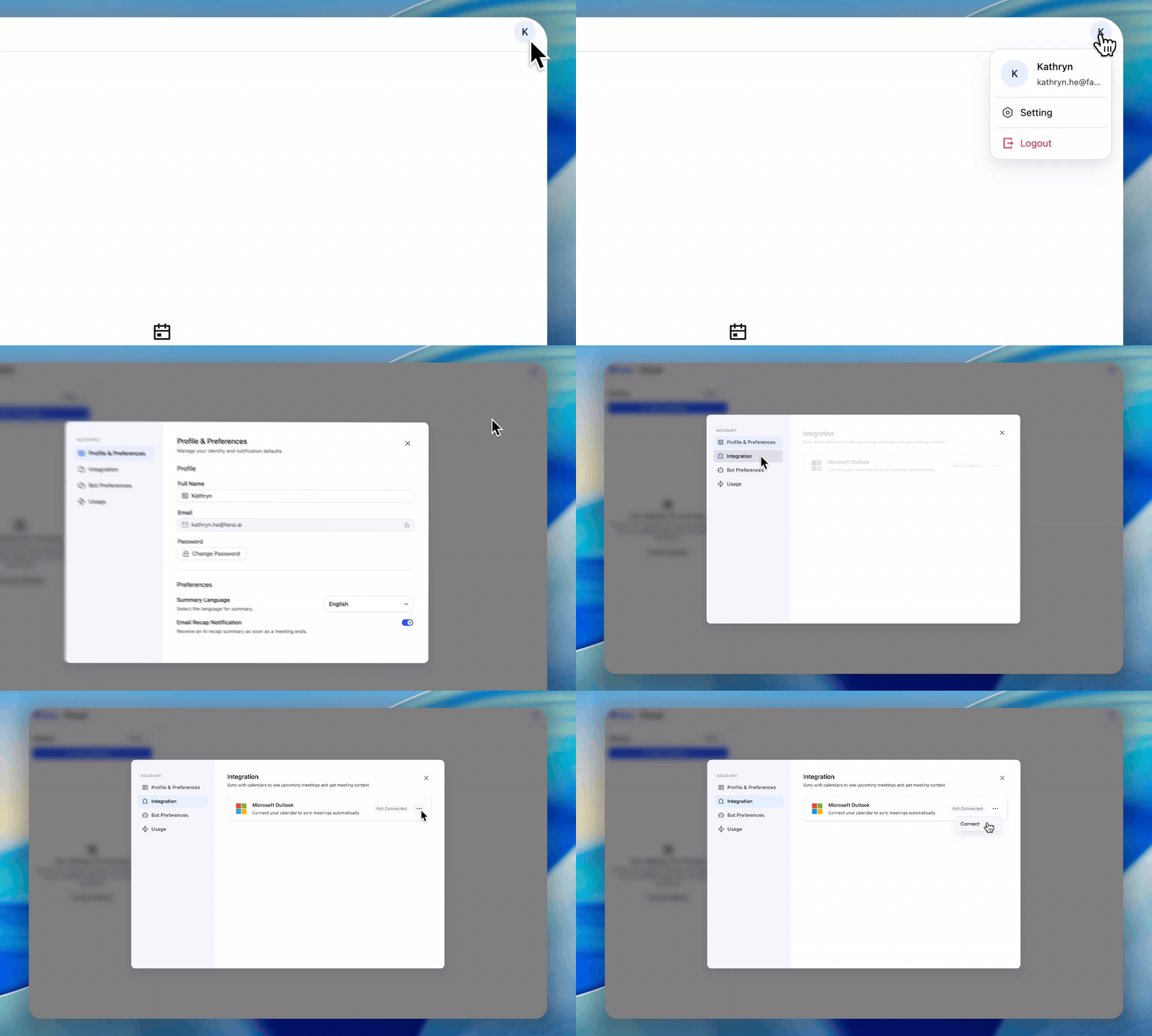
1. Click your **profile avatar** in the top-right corner of the app.
2. Select **Setting**.
3. Go to the **Integration** tab.
4. Find **Microsoft Outlook** and click **Connect**.
5. Sign in with your Microsoft account and grant calendar access.
Once connected, you'll see a green **"Connected"** badge next to Microsoft Outlook.
 Fano only reads your calendar to detect meeting times and join links. It does not modify your calendar events.
## What happens after connecting
* Fano scans your calendar for meetings with video call links (Teams, Zoom, or Google Meet).
* When a scheduled meeting starts, the Fano bot joins automatically — visible to all participants as a note-taker.
* Meetings appear in your Fano Summary dashboard, organized by date.
## Disconnecting your calendar
If you need to disconnect:
1. Go to **Settings → Integration**.
2. Click the **three-dot menu (⋯)** next to Microsoft Outlook.
3. Select **Disconnect**.
After disconnecting, Fano will no longer auto-join your meetings. You can still use **Record Now** or **Upload Meeting** to capture meetings manually.
## Troubleshooting
Make sure your meetings have a video call link (Teams, Zoom, or Google Meet) in the calendar event. Fano can only join meetings that include a join link.
Try disconnecting and reconnecting. If the issue persists, check that your Microsoft account has the required permissions and that pop-ups are not blocked in your browser.
Fano Summary currently supports Microsoft Outlook. Google Calendar support is on our roadmap.
Fano only reads your calendar to detect meeting times and join links. It does not modify your calendar events.
## What happens after connecting
* Fano scans your calendar for meetings with video call links (Teams, Zoom, or Google Meet).
* When a scheduled meeting starts, the Fano bot joins automatically — visible to all participants as a note-taker.
* Meetings appear in your Fano Summary dashboard, organized by date.
## Disconnecting your calendar
If you need to disconnect:
1. Go to **Settings → Integration**.
2. Click the **three-dot menu (⋯)** next to Microsoft Outlook.
3. Select **Disconnect**.
After disconnecting, Fano will no longer auto-join your meetings. You can still use **Record Now** or **Upload Meeting** to capture meetings manually.
## Troubleshooting
Make sure your meetings have a video call link (Teams, Zoom, or Google Meet) in the calendar event. Fano can only join meetings that include a join link.
Try disconnecting and reconnecting. If the issue persists, check that your Microsoft account has the required permissions and that pop-ups are not blocked in your browser.
Fano Summary currently supports Microsoft Outlook. Google Calendar support is on our roadmap.