> ## Documentation Index
> Fetch the complete documentation index at: https://summary-docs.fanocloud.com/llms.txt
> Use this file to discover all available pages before exploring further.
# Exporting & Sharing
> Save a summary or transcript as a PDF, Word or Markdown file to share with people who weren't in the meeting.
Not everyone who needs the notes has a Fano account. Export turns any meeting summary into a file you can email, attach to a ticket, or file in your records system.
## Export a summary
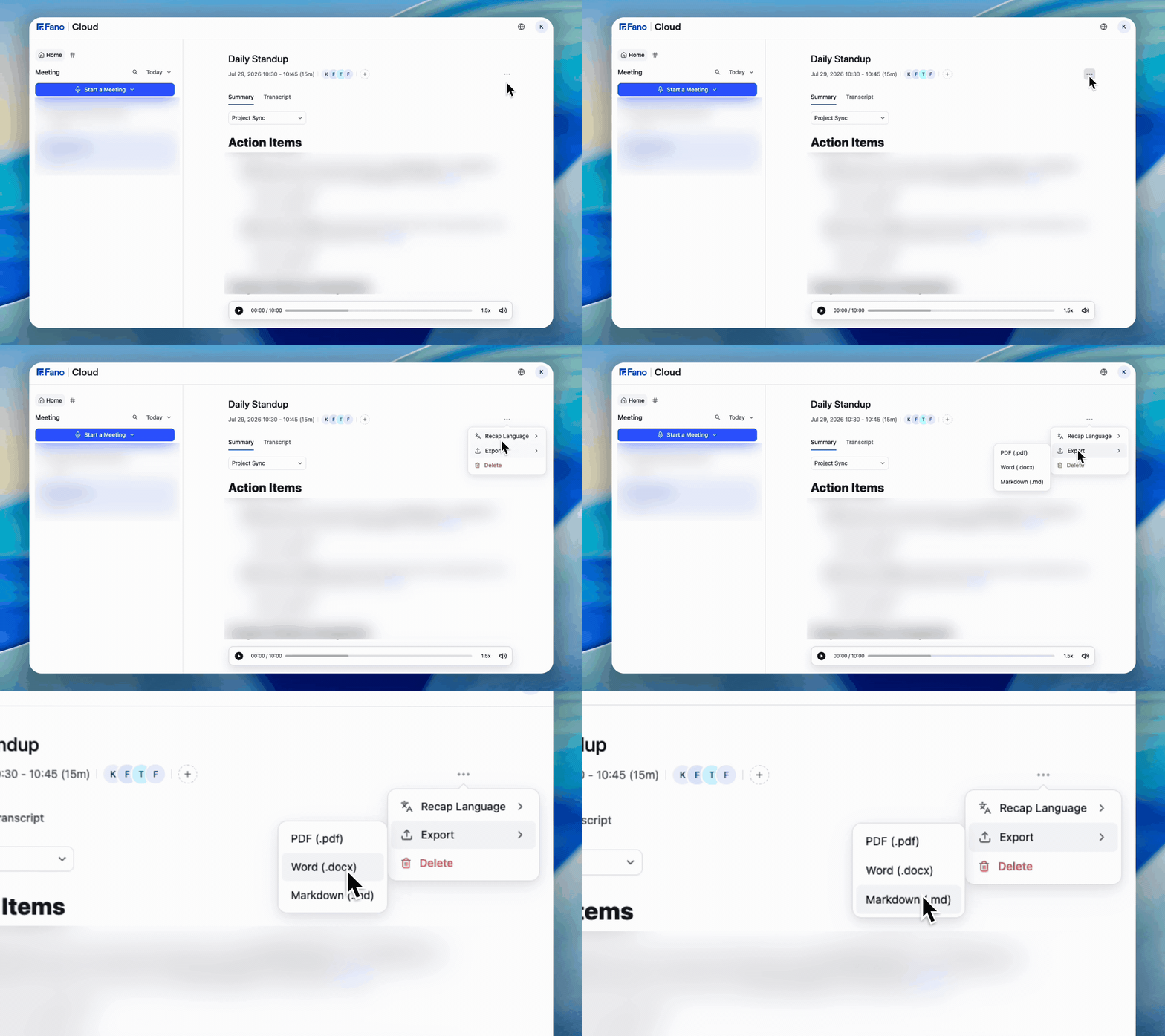 1. Open the meeting you want to export.
2. Open the **⋯** menu in the meeting header.
3. Choose **Export**.
4. Pick your format:
| Format | Best for |
| ------------------ | -------------------------------------------------------------- |
| **PDF (.pdf)** | A fixed record — client-facing minutes, audit files, approvals |
| **Word (.docx)** | Circulating notes people will edit or comment on |
| **Markdown (.md)** | Pasting into Confluence, Notion, Jira, or a repo |
You can also export the **transcript** when you need the full word-for-word record rather than the summary.
## What's included
Exports reflect the summary as it currently stands, which means:
* the **template** currently applied
* the **recap language** currently applied
* any **edits you've made by hand**
Export in the order you want the output: apply the right [template](/meetings/custom-templates), set the [recap language](/meetings/recap-language), [make your edits](/meetings/editing) — then export. Exporting first and fixing the file afterwards means redoing the work every time.
## Two common uses
**Distribute to non-users.** Export as PDF or Word and send it on. Recipients don't need a Fano account, and nothing else in your workspace becomes visible to them.
**Keep a snapshot before a destructive change.** Switching recap language, editing a summary, deleting a template, and deleting a meeting are all one-way. An export is the only copy that survives them.
## What's next?
Set the language before you export.
Export first — deletion is permanent.
1. Open the meeting you want to export.
2. Open the **⋯** menu in the meeting header.
3. Choose **Export**.
4. Pick your format:
| Format | Best for |
| ------------------ | -------------------------------------------------------------- |
| **PDF (.pdf)** | A fixed record — client-facing minutes, audit files, approvals |
| **Word (.docx)** | Circulating notes people will edit or comment on |
| **Markdown (.md)** | Pasting into Confluence, Notion, Jira, or a repo |
You can also export the **transcript** when you need the full word-for-word record rather than the summary.
## What's included
Exports reflect the summary as it currently stands, which means:
* the **template** currently applied
* the **recap language** currently applied
* any **edits you've made by hand**
Export in the order you want the output: apply the right [template](/meetings/custom-templates), set the [recap language](/meetings/recap-language), [make your edits](/meetings/editing) — then export. Exporting first and fixing the file afterwards means redoing the work every time.
## Two common uses
**Distribute to non-users.** Export as PDF or Word and send it on. Recipients don't need a Fano account, and nothing else in your workspace becomes visible to them.
**Keep a snapshot before a destructive change.** Switching recap language, editing a summary, deleting a template, and deleting a meeting are all one-way. An export is the only copy that survives them.
## What's next?
Set the language before you export.
Export first — deletion is permanent.