> ## Documentation Index
> Fetch the complete documentation index at: https://summary-docs.fanocloud.com/llms.txt
> Use this file to discover all available pages before exploring further.
# Recap Language
> Switch an individual meeting's summary into English, Traditional Chinese or Simplified Chinese — without changing your account default.
Your account has a default summary language, but not every meeting has the same audience. **Recap Language** lets you change the language of one meeting's summary on its own.
## Change the language of one summary
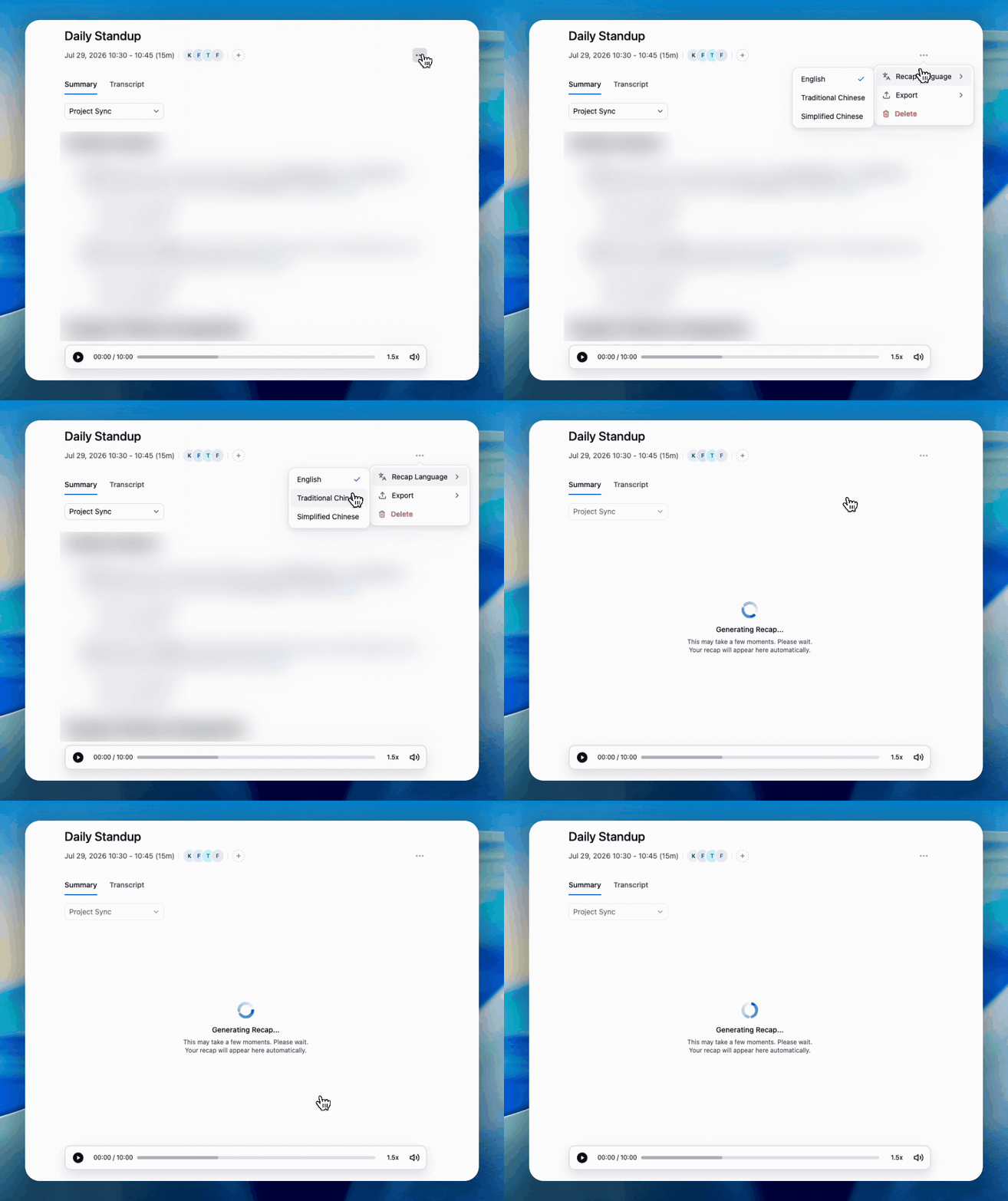 1. Open the meeting.
2. Open the **⋯** menu in the meeting header.
3. Hover **Recap Language**. A check mark shows the language the summary is in now.
4. Pick **English**, **Traditional Chinese** or **Simplified Chinese**.
The summary is replaced with a **Generating Recap…** message while Fano rewrites it, then the new version appears on its own — you don't need to refresh. Any edits you made by hand **carry over**.
This is a per-meeting change. Your account default stays as it is — set that under **Settings → Profile & Preferences → Summary Language**.
## Before you switch
Changing the recap language **replaces** the current summary rather than keeping a second copy, and there's no one-click undo yet. If there's anything in the current version you want to keep, [export it](/meetings/export) or copy it out first.
## Recap language vs. spoken language
Three different things are easy to confuse:
| | What it is | Where it's set |
| ---------------------- | -------------------------------------------- | --------------------------------------------------------------------------- |
| **Spoken language** | What was actually said in the meeting | Detected automatically — nothing to set |
| **Summary language** | The language your summaries are written in | **Settings → Profile & Preferences**, or per meeting via **Recap Language** |
| **Interface language** | The language of menus and buttons in the app | Interface language switcher |
A Cantonese meeting can have a Cantonese-accurate transcript and an English summary — that's the normal case for teams reporting to non-Cantonese readers.
Sharing the same meeting with two audiences? Export the summary in one language, then switch the recap language and export again. Fano doesn't yet keep both versions side by side.
## What's next?
Save the summary as PDF, Word or Markdown before switching.
Set your default summary language for all future meetings.
1. Open the meeting.
2. Open the **⋯** menu in the meeting header.
3. Hover **Recap Language**. A check mark shows the language the summary is in now.
4. Pick **English**, **Traditional Chinese** or **Simplified Chinese**.
The summary is replaced with a **Generating Recap…** message while Fano rewrites it, then the new version appears on its own — you don't need to refresh. Any edits you made by hand **carry over**.
This is a per-meeting change. Your account default stays as it is — set that under **Settings → Profile & Preferences → Summary Language**.
## Before you switch
Changing the recap language **replaces** the current summary rather than keeping a second copy, and there's no one-click undo yet. If there's anything in the current version you want to keep, [export it](/meetings/export) or copy it out first.
## Recap language vs. spoken language
Three different things are easy to confuse:
| | What it is | Where it's set |
| ---------------------- | -------------------------------------------- | --------------------------------------------------------------------------- |
| **Spoken language** | What was actually said in the meeting | Detected automatically — nothing to set |
| **Summary language** | The language your summaries are written in | **Settings → Profile & Preferences**, or per meeting via **Recap Language** |
| **Interface language** | The language of menus and buttons in the app | Interface language switcher |
A Cantonese meeting can have a Cantonese-accurate transcript and an English summary — that's the normal case for teams reporting to non-Cantonese readers.
Sharing the same meeting with two audiences? Export the summary in one language, then switch the recap language and export again. Fano doesn't yet keep both versions side by side.
## What's next?
Save the summary as PDF, Word or Markdown before switching.
Set your default summary language for all future meetings.